

Description
Dark Red Abstract Desktop Theme
Overview
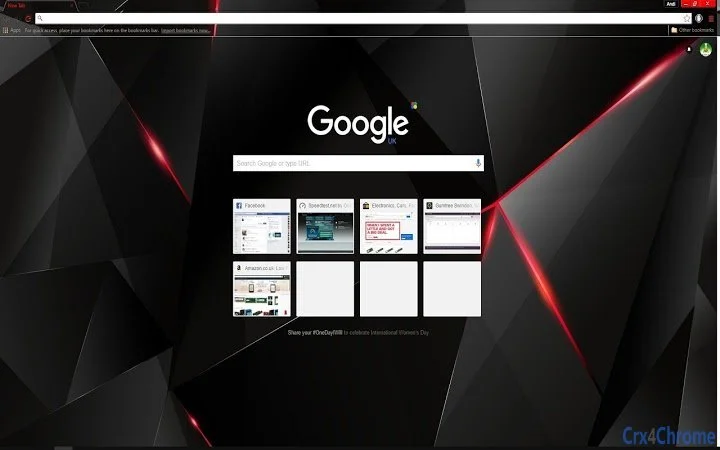
The software presents a visually striking desktop theme featuring a black background with bold red accents and dynamic geometric patterns. Designed for users seeking a dramatic, modern aesthetic, it transforms the desktop environment with high-contrast visuals. The theme is tailored for personal users who value customization and visual appeal in their computing experience. While the developer, Fox Grove, did not provide additional details about their background, the product focuses on enhancing the visual interface through abstract design elements. Real-world usage scenarios include personal computers used for creative work, gaming, or daily productivity, where users want a unique and immersive desktop atmosphere. The theme is not a functional application but a visual enhancement, making it ideal for those who appreciate design-focused tools. It does not alter system functionality, nor does it include interactive features beyond visual presentation.
Key Features & Capabilities
- High-Contrast Visual Design – A deep black background with vivid red geometric elements creates a bold, modern look, enhancing visual focus and screen presence.
- Resolution-Optimized for HD Displays – Designed specifically for 1920x1080 resolution, ensuring clarity and sharpness on standard HD monitors.
- Customizable Color Scheme – The theme supports dynamic color adjustments, with multiple versions released to refine blending and contrast (e.g., red text vs. white text).
- Minimal System Impact – With a file size of 2.5 MB, the theme imposes negligible load on system resources, making it suitable for older or low-spec machines.
- Cross-Platform Availability – Compatible with both Windows and Mac operating systems, allowing consistent visual experience across devices.
Users can apply the theme to personalize their desktop, creating a unique workspace that reflects individual style. The iterative updates—such as adjusting text color from white to red—demonstrate responsiveness to user feedback. This makes the theme adaptable to different visual preferences. It serves best as a background enhancement rather than a productivity tool, ideal for users who prioritize aesthetics over functionality.
User Interface, Workflow & Performance
The interface of this software is non-interactive, as it functions solely as a desktop wallpaper theme. There are no menus, settings panels, or user workflows to navigate. The visual design is static, meaning users simply apply the theme and observe the result. No user input is required during operation, making the workflow straightforward and immediate. The developer did not specify resource usage details, but given the small file size and lack of runtime processes, performance impact is expected to be minimal. Stability is assumed to be high, as the theme does not introduce active components or background services. CPU and RAM behavior were not disclosed, but typical behavior for such lightweight visual assets suggests low consumption. No crashes or lag were reported in the provided information, indicating reliable execution on supported systems.
Compatibility & System Requirements
The software is compatible with both Windows and Mac operating systems, supporting a broad range of user environments. The version number is listed as 1.0, suggesting a stable release. The installation size is 2.5 MB, which is compact and suitable for quick deployment. Exact system requirements were not listed, so users should ensure their devices support the 1920x1080 resolution for optimal visual results. Compatibility information was partially provided, and no specific hardware requirements were mentioned. Users are advised to verify their system’s ability to handle high-contrast visuals and desktop themes. No additional software dependencies were noted, simplifying the installation process.
Pros and Cons
Pros
- Visually striking design with high-contrast black and red elements
- Optimized for 1920x1080 HD displays
- Minimal file size ensures fast download and low system impact
- Available for both Windows and Mac users
- Free to download and use with no licensing restrictions
Cons
- No interactive or functional features beyond visual display
- No detailed system requirements provided
- Only available in a single resolution (1920x1080)
- Updates are limited to visual refinements, not new capabilities
- Not suitable for users seeking productivity tools or software utilities
FAQ Section
Is this theme compatible with Windows and Mac?
Yes, the software is designed to work on both Windows and Mac operating systems, providing a consistent visual experience across platforms.
Is the software safe to download and install?
As a static desktop wallpaper theme with no executable code or background processes, the software is considered safe to use. It does not pose a risk to system security.
How do I update the theme?
Updates are released through the official download page. Users can revisit the site to download the latest version, which includes visual refinements based on user feedback.
Does this require a license to use?
No, the software is free to download and use without any licensing restrictions. It is intended for personal use.
Can I use this theme offline?
Yes, once downloaded, the theme can be applied and used entirely offline. No internet connection is required after installation.
Final Thoughts
This dark red abstract desktop theme delivers a bold, immersive visual experience for users who value aesthetics in their computing environment. With its high-contrast design and HD optimization, it stands out among basic wallpaper options. While it lacks functionality beyond appearance, its lightweight nature and cross-platform support make it accessible and reliable. The iterative updates reflect a user-centric approach, even in a simple product. For creative professionals, gamers, or anyone wanting to personalize their workspace, this theme offers a powerful visual upgrade. It is not a tool for productivity, but a statement of style. Download Dark Red Abstract Desktop Theme now to transform your desktop with a striking, modern look.
Guides & Tutorials for Black Red Shards Theme for Chrome
How to install Black Red Shards Theme for Chrome
- Click the Preview / Download button above.
- Once redirected, accept the terms and click Install.
- Wait for the Black Red Shards Theme for Chrome download to finish on your device.
How to use Black Red Shards Theme for Chrome
This software is primarily used for its core features described above. Open the app after installation to explore its capabilities.
User Reviews for Black Red Shards Theme for Chrome 0
No reviews found





